
Strong Testimonials has 3 main shortcodes:
- Testimonial View Shortcode
[testimonial_view]Each view has a unique shortcode like [testimonial_ view id=”1″]. After you create a view you will see its shortcode next to the title.
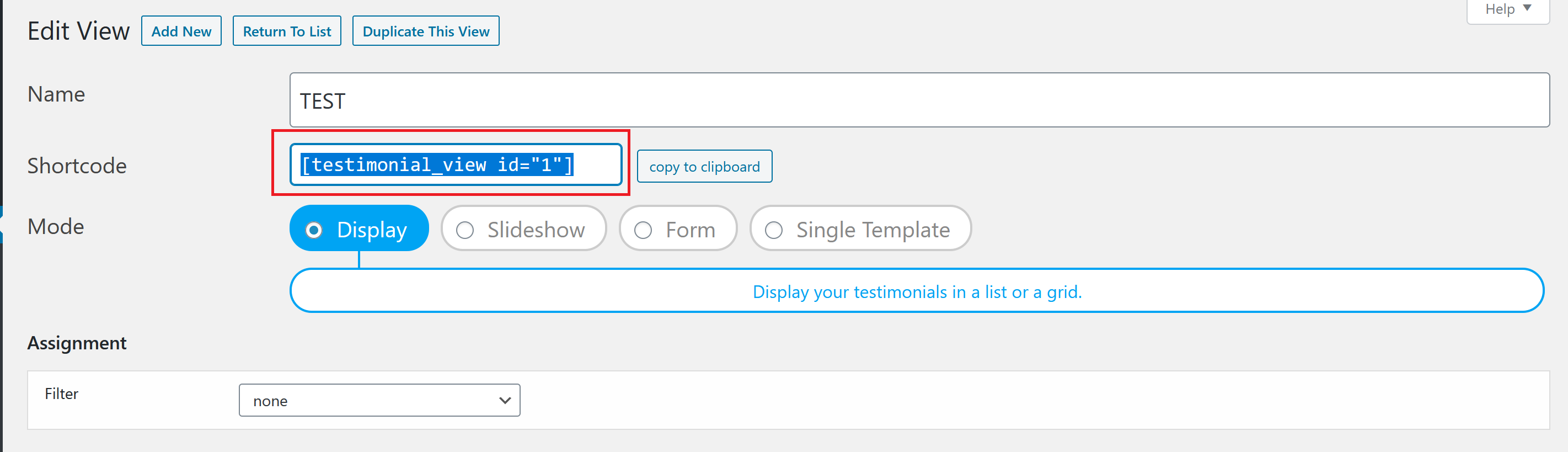
This is the shortcode you need to paste into your page when you want to display testimonials or collect them through the form.
To see exactly how to use it please click here.
Optional shortcode attributes will override the view settings. Use this to create reusable view patterns.
Overridable settings: post_ids, category, order, count.
For example, imagine you have five services, a sales page for each service, and a testimonial category for each service. To display the testimonials on each service page, you can create five duplicate views, one for each category.
Or you can configure one view as a pattern and add it to each service page with the category attribute.
, , etc.
Attributes may be used in combination. For example:
Using post_ids is the most specific method and it will override category and count (whether settings or attributes).
2. Testimonial Count Shortcode
[testimonial_count]Use the shortcode above to count your testimonials. It will display on your page the number of testimonials you have, for example: 29.
Example: Read some of our 41 testimonials!
Read some of our [testimonial_count] testimonials!To count for a specific category, add the category attribute with the category slug.
Example: Here's what 5 local clients say.
Here's what [testimonial_count category="wedding"] local clients say.As you can see, instead of showing '29' (the total number), it only displays '5' - how many testimonials are in the 'wedding' category.
3. Testimonial Average Rating Shortcode
[testimonial_average_rating]To display the average rating. This works for a single rating field. It does not support multiple rating fields yet.
How it looks:
You must use the closing slash / if using the shortcode with content elsewhere on your page.
You can customize the shortcode using content tags:
{title}{stars}{summary}
Shortcode: [testimonial_average_rating]{title} {stars} {summary}[/testimonial_average_rating]How it looks:
Alternate content tags.
{title2}{summary2}
Shortcode: [testimonial_average_rating]{title2} {stars} {summary2}[/testimonial_average_rating]How it looks:
Insert tags into your custom content.
Shortcode: [testimonial_average_rating]{stars} Our average rating is <b>{summary2}</b>[/testimonial_average_rating]How it looks:
Other tags:
{stars}
Shortcode: [testimonial_average_rating]{stars}[/testimonial_average_rating]How it looks:
{average}
Shortcode: [testimonial_average_rating]{average}[/testimonial_average_rating]How it looks:
decimals - If you need to display multiple decimals for average rating you have to set a number to decimal.
Shortcode: [testimonial_average_rating decimals="number" /]How it looks:
{count}
Shortcode: [testimonial_average_rating]{count}[/testimonial_average_rating]How it looks:
field - If using multiple rating fields, you can specify the specific field you need. If using multiple rating fields, you can use "all" to use all the rating fields.
Shortcode: [testimonial_average_rating field="rating" /]How it looks:
Shortcode: [testimonial_average_rating field="all" /]How it looks:
block
Shortcode: [testimonial_average_rating block /]How it looks:
centered
Shortcode: [testimonial_average_rating centered /]How it looks:
rounded - round the rating(ex.: from 4.3 -> 4 or 4.7->5)
Shortcode: [testimonial_average_rating rounded ]How it looks:
block and centered
Shortcode: [testimonial_average_rating block centered /]How it looks:
default container - The default container element is div.
Shortcode: [testimonial_average_rating element="span" /]How it looks: